Choosing the Right Laser Cut Wall Mounted Shelf Design for Your Glowforge
Integrating functional storage with custom aesthetics is a primary goal for many modern makers and homeowners. When exploring options for home organization, the concept of a Wall Mounted Shelf created via Laser Cut technology stands out as a versatile solution. Specifically, utilizing a Glowforge or similar desktop CO2 laser cutter allows for precision engineering that traditional woodworking often cannot match without significant labor. However, selecting the right digital file and material combination requires a clear understanding of structural integrity, design intent, and the specific capabilities of your machinery.
This guide evaluates the practical considerations of implementing a laser-cut shelving unit, focusing on the balance between digital design files and physical material constraints. Whether you are a hobbyist looking to utilize a Glowforge file for a weekend project or a small business owner assessing product viability, understanding the nuances of thickness, joinery, and load-bearing capacity is essential.
Understanding the Mechanics of Laser-Cut Joinery
The fundamental advantage of a Wall Mounted Shelf produced through Laser Cut methods lies in the precision of the kerf and the tightness of the joints. Unlike nailed or screwed assemblies, laser-cut furniture relies on friction-fit tabs and slots. This approach creates a clean, seamless look but demands exactitude in the digital blueprint.
When reviewing a Glowforge file, one of the first technical specifications to evaluate is the material thickness parameter. Designs are rarely universal; a file optimized for 3mm acrylic will not function correctly with 5mm plywood without modification. The slot width in the vector file must account for the laser's kerf (the width of material removed by the beam) to ensure a snug fit. If the slot is too wide, the shelf will wobble; if too narrow, the material may crack during assembly or fail to insert entirely.
For instance, a design marketed as a "Space-Saving Buddy" often utilizes interlocking geometric patterns to maximize stability while minimizing visible hardware. These designs work exceptionally well when the tolerance between the digital cut path and the physical material is calibrated correctly. Users must verify if the provided Wall Mounted Shelf Laser Cut File includes multiple versions for different material thicknesses or if manual adjustment in vector software like Illustrator or Inkscape is required.
Material Selection: Acrylic vs. Wood
The choice of material significantly influences the final outcome of a Laser Cut project. Two primary categories dominate this space: wood composites (such as birch plywood or MDF) and acrylics. Each offers distinct tradeoffs regarding durability, appearance, and ease of cutting.
- Wood Composites: Materials like 3mm or 5mm birch plywood provide a warm, natural aesthetic that blends well with traditional decor. They generally offer higher shear strength, making them suitable for holding heavier items like books or potted plants. However, wood is an organic material; it can warp over time if exposed to humidity, and the edges may require sanding post-cut to remove soot.
- Acrylic: Often preferred for modern, minimalist interiors, acrylic provides a sleek, glossy finish. A Wall Mounted Shelf made from cast acrylic can appear to float, especially if edge-polished. While visually striking, acrylic can be more brittle than wood under point loads. Furthermore, certain types of acrylic (like extruded varieties) may not cut as cleanly on some desktop lasers, potentially leaving rough edges that require flame polishing.
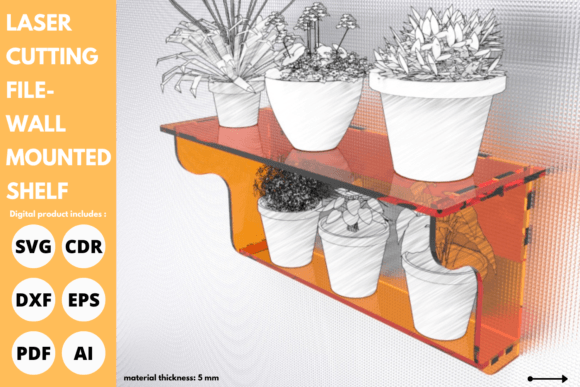
It is crucial to note that some digital products specify a "Spice Rack" design intended for 5mm materials, while others, like the introductory shelf mentioned in various marketplaces, target 3mm thickness. Using a 5mm design with 3mm material will result in loose joints that compromise the shelf's ability to hold weight. Conversely, forcing 5mm material into a 3mm slot risks damaging both the material and the laser lens if the bed height is not adjusted properly.
Evaluating Digital Files and Design Complexity
Not all Glowforge files are created equal. When sourcing a Wall Mounted Shelf Laser Cut File, buyers should assess the complexity of the vector paths. Simple designs with fewer cuts are faster to produce and reduce the risk of machine error, but they may lack the intricate detailing that justifies using a laser cutter in the first place.
More complex files often include decorative elements such as floral patterns, geometric lattices, or custom text. While these add flair, they also increase cutting time and the potential for heat accumulation, which can scorch delicate materials. A balanced approach involves selecting a design where the decorative elements do not compromise the structural nodes. For example, a shelf designed to hold stationery might feature a solid backplate with a decorative front lip, whereas a plant stand might prioritize open spaces to allow light penetration.
Additionally, consider the assembly logic. High-quality files often include numbered parts or clear layer distinctions in the software, streamlining the build process. Poorly organized files can lead to confusion, resulting in wasted material and frustration. The "easy installation" promise found in many product descriptions holds true only if the file is well-structured and the user has performed a test cut to verify fitment.
Load Bearing Capabilities and Safety Considerations
A critical factor often overlooked in the enthusiasm for DIY projects is load-bearing capacity. A Wall Mounted Shelf is only as strong as its weakest joint and its mounting mechanism. Laser-cut shelves, particularly those made from 3mm material, have inherent limitations compared to traditional lumber shelving.
For light-duty applications—holding small succulents, lightweight paperbacks, or decorative trinkets—a 3mm Laser Cut design is typically sufficient. The interlocking nature of the joints distributes weight effectively across the plane of the shelf. However, for heavier loads such as hardcover encyclopedias, large ceramic pots, or kitchen spices in glass jars, a thicker material (5mm or greater) and a reinforced design are necessary.
Furthermore, the method of wall attachment is paramount. Many laser-cut designs rely on a keyhole slot system or a separate bracket hidden behind the unit. Ensure that the chosen Glowforge file accounts for the hardware required to secure the unit to drywall or studs. Relying solely on adhesive strips is generally inadvisable for anything other than the lightest displays, as the leverage exerted on the wall mount can cause failure over time.
When to Choose Laser Cutting vs. Traditional Methods
Deciding whether to proceed with a Wall Mounted Shelf Laser Cut File versus purchasing pre-made shelving or building with traditional tools depends on several factors:
- Customization Needs: If you require a specific size, shape, or personalized engraving that off-the-shelf products cannot offer, laser cutting is the superior choice. The ability to tweak a Glowforge file allows for infinite customization.
- Production Volume: For single-unit projects, the setup time of a laser cutter is justified by the precision. For mass production, the speed of industrial CNC routing might be more efficient, though desktop lasers remain viable for small-batch artisanal runs.
- Aesthetic Preference: If the goal is a hyper-modern look with intricate details impossible to achieve with a jigsaw or drill, laser cutting provides a unique finish. However, if a rustic, hand-hewn look is desired, traditional woodworking may be more appropriate.
- Tool Availability: Access to a machine like a Glowforge is a prerequisite. If one does not own a laser cutter, the cost of using a makerspace or outsourcing the cut must be factored into the total project cost.
Making an Informed Decision
Ultimately, integrating a Wall Mounted Shelf into your space via Laser Cut technology offers a rewarding blend of functionality and creativity. It transforms a simple storage need into an opportunity for personal expression. However, success hinges on respecting the limitations of the materials and the precision of the digital files.
Before committing to a specific Glowforge file, carefully review the recommended material thickness, analyze the joint design for structural soundness, and honestly assess the intended load. Whether you choose a 3mm design for delicate displays or a robust 5mm configuration for kitchen organization, the key lies in matching the digital potential with physical reality. By approaching the project with a researcher's mindset—evaluating tradeoffs and verifying specifications—you can create a shelving solution that is not only a "space-saving buddy" but a lasting testament to the power of digital fabrication.