Wheel Collection: A Practical Evaluation for Laser and CNC Cutting Projects
For makers, designers, and fabricators working with computer-controlled cutting machinery, finding reliable, high-quality vector files is a critical step in the production workflow. The Wheel Collection represents a curated set of digital assets designed specifically for laser cutting and CNC routing applications. This article provides an objective evaluation of this digital product, examining its technical specifications, material compatibility, and suitability for various project types. By understanding the specific attributes of this collection, users can determine whether it aligns with their current design needs and manufacturing capabilities.
Understanding the Wheel Collection Digital Asset
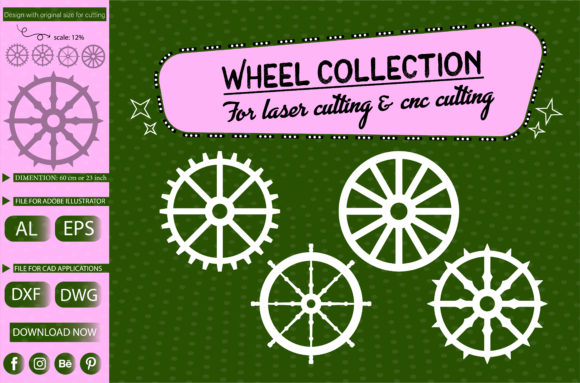
The Wheel Collection is not a physical product but a downloadable digital file package containing vector graphics intended for fabrication. At its core, this collection features four distinct wheel designs. These are not simple geometric circles but intricate patterns suitable for decorative or functional applications. The primary value proposition lies in the readiness of these files for immediate use in manufacturing environments, eliminating the need for time-consuming vector creation from scratch.
Each design within the collection is scaled to a substantial diameter of 600 mm. This large format makes the designs suitable for significant installations, such as wall art, room dividers, garden features, or large-scale decorative panels. The inclusion of multiple designs in a single file allows users to compare aesthetics and select the most appropriate pattern for their specific context without managing multiple downloads or disparate file sources.
Technical Specifications and File Compatibility
One of the most critical aspects of any digital cutting file is its compatibility with various software ecosystems and hardware controllers. The Wheel Collection addresses this by providing the source files in four industry-standard formats: AI (Adobe Illustrator), EPS (Encapsulated PostScript), DXF (Drawing Exchange Format), and DWG (AutoCAD Drawing).
- AI and EPS: These formats are ideal for users working within Adobe Creative Cloud ecosystems or other vector editing software like CorelDRAW. They preserve editable paths and layers, allowing for last-minute adjustments to node points or line weights before sending the job to the cutter.
- DXF and DWG: These are the standard formats for CAD (Computer-Aided Design) and CAM (Computer-Aided Manufacturing) software. They are universally recognized by CNC routers and many laser cutting control programs, ensuring broad hardware compatibility.
Furthermore, the files have been tested in Silhouette Studio, a popular software for desktop cutting machines. While the 600 mm dimension may exceed the bed size of smaller desktop cutters, this verification confirms that the vector paths are clean, closed, and free of errors that typically cause software crashes or cutting interruptions. This multi-format approach reduces friction for users regardless of their preferred workflow, whether they are professional industrial operators or hobbyists using prosumer-grade equipment.
Material Versatility and Application
The utility of the Wheel Collection extends beyond file format compatibility to material versatility. The designs are engineered to be cut on a variety of substrates, including wood, Plexiglas (acrylic), and multi-style composite materials. This flexibility allows creators to adapt the same design to different aesthetic and functional requirements.
When cut from wood, such as plywood or MDF, these wheels can serve as rustic or modern decorative elements, suitable for interior design features or outdoor landscaping if treated properly. Cutting from Plexiglas or acrylic offers a contemporary, sleek look, often used in retail displays, lighting fixtures, or modern art installations. The intricate nature of the wheel designs requires material stability; therefore, brittle materials may require careful handling, while flexible materials might need additional support during the cutting process.
Evaluating the Design Complexity
The four designs included in the collection vary in complexity, offering options for different cutting speeds and detail levels. Intricate designs provide a high visual impact but may require slower cutting speeds and higher precision settings to avoid burn marks on wood or melting on acrylic. Simpler patterns within the collection may allow for faster production runs. Users should evaluate the specific design against their machine’s tolerance and their desired finish quality. For instance, a CO2 laser cutter may handle fine details in acrylic differently than a fiber laser or a mechanical CNC router.
Benefits and Tradeoffs
Choosing a pre-made digital asset like the Wheel Collection involves weighing several factors. Understanding these tradeoffs helps in making an informed decision.
Advantages
- Time Efficiency: Creating complex, symmetrical wheel patterns from scratch requires significant skill in vector software and time for testing. This collection provides instant access to production-ready files.
- Cost-Effectiveness: Compared to hiring a graphic designer for custom work, purchasing a digital file bundle is a low-cost alternative for obtaining professional-grade designs.
- Scalability: As vector files, the designs can be scaled up or down without loss of quality, although the default 600 mm size is optimized for structural integrity and visual balance.
Considerations and Limitations
While the collection offers convenience, it lacks customization. Users seeking highly specific modifications or unique branding elements may find the fixed designs restrictive. Additionally, the 600 mm size may be too large for small-scale crafts or jewelry making, requiring users to scale down significantly, which could affect the readability of finer details depending on the cutting tool’s kerf width.
Another consideration is the learning curve associated with file preparation. Although the files are tested, users must still understand how to set power, speed, and frequency settings on their specific machines for the chosen material. The file itself does not guarantee a perfect cut; proper machine calibration and material knowledge remain essential.
Decision-Making Insights: Is This Collection Right for You?
To determine if the Wheel Collection is a strong fit for your projects, consider your current workflow and goals. This product is particularly suitable for:
- Interior Designers and Decorators: Looking for repeatable, large-format decorative elements for walls or partitions.
- Fabrication Shops: Needing quick-turnaround designs for client projects involving wood or acrylic signage.
- Hobbyists and Makers: Who want to experiment with complex cuts without investing hours in design software.
- Educational Institutions: Teaching students about vector file management and CNC/laser operation using reliable, error-free files.
Conversely, alternatives may be worth considering if you require fully customizable parametric designs, if your working area is significantly smaller than 600 mm and you lack the software skills to resize vectors effectively, or if you are looking for 3D modeling files rather than 2D vector cuts. In such cases, CAD software subscriptions or custom design services might offer better alignment with your needs.
Final Thoughts on Implementation
The Wheel Collection serves as a practical resource for anyone involved in digital fabrication. Its strength lies in its broad file compatibility, tested reliability, and aesthetic versatility across different materials. By providing four distinct designs in a single package, it offers variety and value. However, successful implementation depends on the user’s ability to match the file’s requirements with their machine’s capabilities and material choices. For those seeking efficient, high-quality vector assets for large-scale cutting projects, this collection represents a logical and effective solution. Always perform test cuts on scrap material before committing to final production to ensure optimal results with your specific setup.