Feather Wall Art Design SVG Cut File Guide
The delicate curve of a feather has long symbolized lightness, freedom, and artistic grace. When translated into physical form through modern fabrication tools, this natural shape becomes a stunning piece of interior decor. A Feather Wall Art Design SVG Cut File serves as the digital blueprint for bringing this vision to life. Unlike a static image you might print on paper, this digital asset is engineered specifically for precision machinery. It contains the mathematical paths required for laser cutters, CNC routers, and vinyl plotters to slice through materials like wood, acrylic, metal, or cardstock with exacting accuracy.
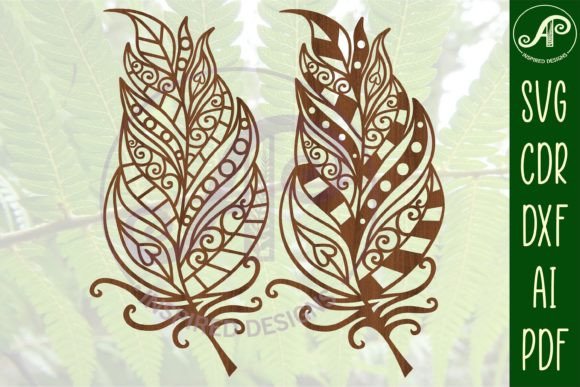
This specific design package typically includes multiple file formats—such as SVG, DXF, AI, CDR, and PDF—to ensure compatibility across a vast array of software ecosystems. Whether you are using LightBurn for a laser, VCarve for a router, or Illustrator for a craft cutter, the goal is the same: to provide a reliable foundation for creation. The design often comes in two distinct versions, offering flexibility in how the final piece is assembled or displayed. With recommended cutting dimensions ranging from 30 to 50 centimeters, these files are scalable, allowing makers to adapt the project to fit a small shelf or a large living room wall without losing structural integrity.
Why This Digital Asset Matters to Different Makers
The value of a digital cut file is not uniform; it shifts dramatically depending on who is holding the mouse. For a weekend hobbyist, the primary appeal might be the joy of seeing a machine create something beautiful from a blank sheet of plywood. For a small business owner, that same file represents inventory, potential revenue, and brand identity. Understanding these differing perspectives helps users select the right tools and approach for their specific situation.
For beginners just entering the world of digital fabrication, the complexity of vector graphics can feel daunting. A pre-made Feather Wall Art Design SVG Cut File removes the barrier of entry regarding design skills. Instead of struggling with bezier curves and node editing in Adobe Illustrator or CorelDRAW, a novice can focus on the mechanics of the machine itself. They learn about feed rates, power settings, and material hold-downs. The priority here is ease of use and learning value. If the file includes clearly marked exterior cut lines, perhaps in blue as some packages do, it simplifies the setup process, reducing the likelihood of costly errors during the first few attempts.
Conversely, experienced professionals and seasoned creators evaluate these files through a lens of quality and flexibility. They are less concerned with whether they can open the file and more interested in the topology of the vectors. Are the nodes optimized? Is the path continuous to prevent unnecessary pen lifts or laser pauses? A professional might take the base feather design and modify it, adding intricate internal patterns or combining it with other elements to create a custom commission for a client. For them, having access to editable formats like AI, CDR, or DXF is non-negotiable. They need the freedom to deconstruct and rebuild the design to meet unique spatial requirements or aesthetic preferences.
Practical Applications Across Various Fields
The versatility of a feather motif allows it to transcend simple decoration. Different sectors utilize these cut files in ways that align with their specific operational goals.
- Interior Designers and Home Decor Enthusiasts: For those focused on aesthetics, the feather design offers a timeless element that complements bohemian, minimalist, or rustic interiors. A homeowner might use a CNC router to cut the design from a solid slab of walnut, sanding and oiling it to create a warm, organic focal point above a bed or sofa. The ability to scale the file to exactly 50cm tall ensures it fits perfectly within a designated niche.
- Event Planners and Wedding Coordinators: Speed and presentation are critical in the events industry. A planner might use a laser cutter to produce dozens of feather silhouettes from lightweight acrylic or mirrored material to serve as table centerpieces or backdrop elements. The consistency provided by a digital file ensures every piece looks identical, maintaining a high standard of polish for the event.
- Educators and STEM Instructors: In a classroom setting, this file becomes a teaching tool. Educators can use the feather design to demonstrate principles of geometry, symmetry, and computer-aided manufacturing. Students learn how a digital concept translates into a physical object, bridging the gap between abstract math and tangible art.
- Small Business Owners and Entrepreneurs: For a creator selling on platforms like Etsy or at local craft fairs, this file is a product source. They might cut the feathers from painted MDF to sell as ready-to-hang art, or offer them as unfinished blanks for customers to paint themselves. The commercial value lies in the efficiency of production; once the file is loaded, the machine does the heavy lifting, allowing the business owner to focus on marketing and customer service.
Evaluating File Formats and Technical Specifications
When downloading a package containing SVG, DXF, AI, CDR, and PDF files, it is helpful to understand which format serves your specific workflow best. The SVG (Scalable Vector Graphics) format is widely supported by web-based cutter software and is excellent for general crafting machines. It preserves the scalability of the image, meaning you can resize the feather from 10cm to 100cm without any pixelation or loss of detail.
For industrial or semi-industrial applications, DXF (Drawing Exchange Format) is often the gold standard. It is universally accepted by CAD software and CNC control systems, ensuring that the dimensions remain precise regardless of the machine being used. If you are a user of CorelDRAW, the inclusion of a CDR file saves time by eliminating the need for conversion, which can sometimes introduce errors in node alignment. Similarly, AI files are essential for Adobe Illustrator users who intend to manipulate the design further.
A crucial aspect of these files is how the cut lines are defined. High-quality downloads often separate cut lines from engrave lines or use specific colors to denote different actions. For instance, having exterior cut lines in blue allows a laser operator to quickly assign "Cut" operations to that specific color layer in their control software, while leaving other layers for etching or ignoring them entirely. This attention to detail significantly improves workflow speed and reduces the risk of miscommunication between the designer's intent and the machine's execution.
Making the Right Choice for Your Project
Deciding whether a Feather Wall Art Design SVG Cut File is the right addition to your library depends on your current project needs and skill level. If you are looking for a quick weekend project to test a new machine, the pre-scaled options (such as the recommended 30 to 50cm height) provide a safe starting point. You can verify your machine's calibration and material settings without committing to a massive, expensive sheet of material.
However, if your goal is long-term utility or commercial production, look for files that offer clean geometry and multiple format options. Consider the material you intend to use. A design that works beautifully in 3mm acrylic might require slight modifications if you plan to cut it from 18mm plywood, particularly regarding bridge points or delicate tips that could break during handling. Experienced users often anticipate these material constraints and adjust the file accordingly before sending it to the cutter.
Ultimately, the true power of these digital downloads lies in their immediacy and adaptability. There is no shipping wait time; the moment the purchase is complete, the creative process can begin. Whether you are a freelancer looking to expand your portfolio, a parent helping a child with a school project, or an artist seeking to automate part of your production, these files offer a bridge between digital possibility and physical reality. By understanding the nuances of the formats and the specific needs of your audience or end-user, you can transform a simple feather outline into a meaningful, lasting piece of art.