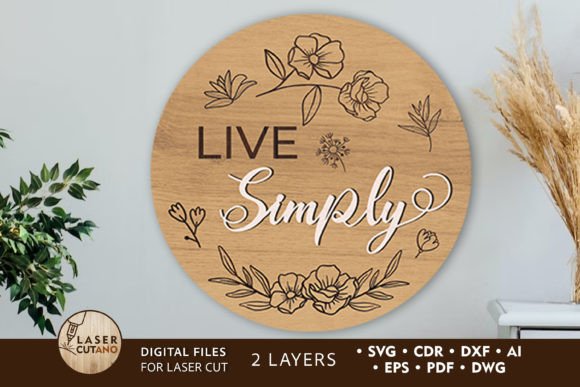
Layered Wall Decor Panel Template Guide
Transforming a blank wall into a focal point of your home often requires more than just paint or a simple poster. It demands texture, depth, and a touch of personal craftsmanship. This is where a Wall Decorastive Panel, Layered Template becomes an invaluable resource. Unlike standard flat designs, these digital multilayer layout files are engineered specifically for precision cutting machines like laser cutters and CNC routers. They allow creators to build three-dimensional wood signs that add a rustic, charming, and deeply inviting atmosphere to any living space. Whether you are hanging a meaningful quote above a mantle or creating a custom piece for a client, understanding how these layered files work is the first step toward professional-quality results.
At its core, this type of template is a collection of vector files prepared in formats such as .AI, .SVG, .DXF, .DWG, .CDR, .EPS, and .PDF. Once downloaded and unzipped, these files provide the exact paths needed to cut materials like plywood, MDF, acrylic, plexiglas, or even thick cardboard. The specific design discussed here features a finished product size of 15 x 15 inches and utilizes a two-layer construction. This simplicity is deceptive; it allows for significant visual impact when the layers are stacked, creating shadows and depth that flat signage cannot achieve. For those working with wood, the recommended material thickness ranges from 3mm to 6mm (approximately 1/8 inch to 1/4 inch), ensuring the layers bond securely while maintaining a sleek profile.
Why Different Creators Value Layered Designs
The appeal of a Wall Decorastive Panel, Layered Template varies significantly depending on who is holding the digital file. What matters most to a weekend hobbyist might differ entirely from the priorities of a small business owner or an educator. Recognizing these differences helps you evaluate whether this specific tool aligns with your current goals and skill level.
For beginners and hobbyists, the primary attraction is often ease of use and the promise of a professional finish without needing advanced design skills. These users may not know how to create vector art from scratch or understand the nuances of kerf compensation in laser cutting. A pre-made layered template removes the barrier to entry. They can focus on the tactile joy of assembly—sanding the edges, choosing the right stain, and gluing the layers together. The practical value here is confidence; knowing the dimensions are correct and the layers will fit together allows them to complete a project that looks store-bought but feels handmade.
In contrast, professionals and entrepreneurs running sign-making businesses view these templates through the lens of efficiency and scalability. Time is money. Spending hours designing a unique 15x15 inch sign for a single order might not be profitable. However, having a library of ready-to-cut multilayer layouts allows them to fulfill custom orders rapidly. They care about file compatibility (.DXF and .DWG are crucial for CNC workflows) and material optimization. Can they nest multiple copies of this design on a single sheet of plywood to minimize waste? Is the design flexible enough to be resized or modified slightly for different clients without breaking the layer alignment? For this group, the template is a production asset that increases throughput.
Educational and Creative Applications
Educators and workshop leaders find unique value in layered templates as teaching tools. In a classroom setting or a community maker-space, safety and predictability are paramount. A two-layer design is simple enough for students to understand the concept of depth and assembly without overwhelming them with complex joinery. It serves as a perfect introduction to how digital files translate into physical objects. Students can learn about material thickness constraints—seeing firsthand why a 6mm layer fits perfectly with another 6mm layer to create a specific look. Furthermore, because the design supports various materials, educators can demonstrate how the same file produces different results when cut from acrylic versus wood, teaching versatility in manufacturing.
Interior designers and home decorators, on the other hand, evaluate these templates based on aesthetic flexibility and customization potential. They are less concerned with the cutting process itself and more focused on the final presentation. Does the 15x15 inch scale fit standard nooks in modern homes? Can the "meaningful quote" or phrase within the design be swapped out to match a client's personal mantra? For these users, the template is a starting point for bespoke decor. They might use the layered structure to incorporate lighting, placing LED strips between the two layers to create a glowing effect, or they might paint the back layer a contrasting color to make the front layer pop. Their priority is the emotional resonance of the piece and how it contributes to a warm, inviting atmosphere.
Practical Considerations for Your Project
Before diving into production, it is essential to assess your specific needs against the capabilities of the Wall Decorastive Panel, Layered Template. Here are a few practical factors to consider:
- Material Selection: While plywood and MDF are standard for a rustic look, remember that acrylic and plexiglas offer a modern, sleek alternative. If you are aiming for an outdoor sign, ensure your chosen material and adhesive are weather-resistant.
- Machine Compatibility: Verify that your laser cutter or CNC router can handle the recommended material thickness of 3–6 mm. Most desktop machines handle this range easily, but always check your specific model's limits.
- Assembly Method: With only two layers, the assembly is straightforward. However, consider how you will join them. Wood glue works well for porous materials, while specialized adhesives are needed for acrylics. The design assumes a flush stack, so ensure your cutting bed is level to avoid uneven layers.
- Customization: Since the files come in editable formats like .AI and .SVG, you have the freedom to tweak the text. If you are not a designer, proceed with caution; moving elements might disrupt the layer alignment. It is often safer to keep the layout intact and only change the text content if you are confident in your vector editing skills.
Making the Right Choice for Your Goals
Ultimately, deciding to use a layered template comes down to what you want to achieve. If you are looking to learn the ropes of digital fabrication, this two-layer design offers a low-risk, high-reward starting point. If you are a business owner looking to expand your product line with minimal overhead, it provides an immediate inventory of sellable goods. For the homeowner, it offers a pathway to create something truly personal—a sign that speaks to your values and enhances your sanctuary.
The beauty of these digital assets lies in their adaptability. The same file that helps a freelancer deliver a quick commission can also help a parent create a heartfelt gift for a teacher. By understanding the technical specifications—like the 15x15 inch footprint and the dual-layer construction—you can plan your material purchase and machine setup with confidence. Remember to unzip your folder immediately after download to access the full suite of formats, ensuring you have the right file type for your specific software and hardware setup. Whether you are driven by creativity, commerce, or the simple joy of making, a well-prepared layered template bridges the gap between digital idea and tangible reality.