Turtle 3D Multilayer SVG Laser Cut Guide
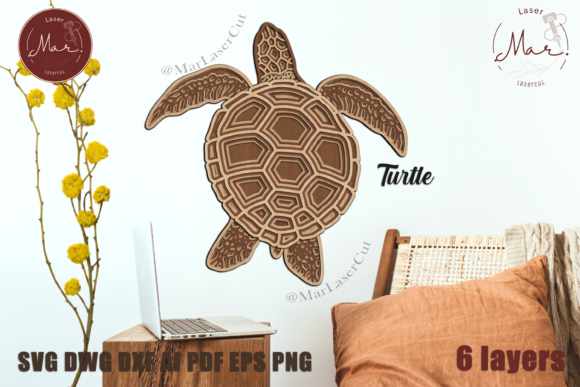
Creating dimensional art that captures attention requires more than just a good design; it demands precision, compatibility, and a clear vision for the final product. The TURTLE 3D Multilayer SVG Laser Cut file offers creators a sophisticated pathway to produce stunning wall art or decorative pieces without starting from scratch. Whether you are a seasoned woodworker, a hobbyist with a desktop cutter, or an entrepreneur looking to expand your product line, this digital asset provides the structural foundation needed for high-quality results. By leveraging a pre-engineered six-layer design, you bypass the tedious process of manual vector drafting and focus entirely on material selection, finishing, and assembly.
Understanding the Value of Pre-Engineered Multilayer Designs
One of the most significant hurdles in laser cutting and paper crafting is achieving consistent depth and alignment across multiple layers. When designing complex 3D models from scratch, creators often spend hours adjusting kerf widths, testing interlocking mechanisms, and ensuring that each layer aligns perfectly with the one beneath it. The TURTLE 3D Multilayer SVG Laser Cut eliminates this technical friction. The file comes ready to use, with six distinct layers already optimized for stacking. This allows you to move directly from download to production, significantly reducing the time between concept and completion.
For small business owners and Etsy sellers, time efficiency translates directly to profitability. Instead of billing hours for design work, you can allocate that time to marketing, customer service, or producing additional units. For educators and workshop leaders, this reliability ensures that students or participants can achieve professional-looking results even if they are new to layered crafting. The design’s overall dimensions of 276 x 277 mm (approximately 10.8 x 10.9 inches) make it a versatile size for home decor, fitting comfortably on standard shelves or as part of a larger gallery wall.
Compatibility Across Machines and Materials
A major advantage of this digital product is its broad compatibility. The ZIP folder includes files in AI, EPS, SVG, DWG, DXF, PDF, and PNG formats. This versatility ensures that whether you operate a high-powered CO2 laser, a compact Glowforge, or a blade-based cutter like Silhouette or Cricut, you can utilize the design effectively. Vector formats like SVG and DXF are ideal for laser machines because they maintain sharp edges at any scale, while PDF and PNG options provide flexibility for those who may need to print references or use image-based tracing tools.
The choice of material dramatically influences the aesthetic outcome. While the design is robust enough for various substrates, understanding how different materials interact with the layers is crucial. Wood, such as MDF or plywood, is highly recommended if you plan to paint the finished piece. Wood absorbs paint well, allowing for smooth gradients and solid colors that highlight the depth of the six layers. If you prefer a modern, translucent look, colored acrylic or plexiglass offers a sleek alternative. Using glitter acrylic can add a dynamic visual texture that changes with the lighting in the room. For paper crafters using Cricut or Silhouette machines, heavy cardstock provides the necessary rigidity to prevent warping when layers are stacked.
Creative Customization and Finishing Techniques
Receiving a digital file does not mean you are locked into a single appearance. In fact, the TURTLE 3D Multilayer SVG Laser Cut serves as a canvas for your creativity. The instructions suggest placing layers in the order found in the reference image, but the color and texture possibilities are endless. You might choose a monochromatic scheme, painting each layer a slightly different shade of blue to mimic the ocean, or opt for high-contrast colors to make each layer distinct.
For those working with wood, sanding between layers before assembly can create a smoother finish, while leaving the natural grain visible on certain layers can add organic warmth. If you are using acrylic, consider frosted finishes for the inner layers to diffuse light if you plan to add backlighting. Combining materials is another advanced technique; for instance, using a wooden base for stability and acrylic for the upper, more detailed layers can create a unique mixed-media effect. This flexibility allows each creator to produce a one-of-a-kind item, even when using the same underlying vector file.
Practical Assembly and Best Practices
Assembly is the final critical step in bringing the TURTLE 3D Multilayer SVG Laser Cut to life. Because the design consists of six separate layers, alignment is key. It is advisable to dry-fit the pieces before applying any adhesive. Lay out all cut components in order, checking for any debris or char marks that may have occurred during cutting. Cleaning the edges with a soft brush or fine sandpaper ensures a tight fit between layers.
When gluing, use a minimal amount of adhesive to prevent squeeze-out, which can mar the surface of the visible layers. Wood glue works well for plywood and MDF, while cyanoacrylate (super glue) or specialized acrylic cement is better for plastic materials. Clamping the piece gently while the glue sets can help maintain flatness, especially if you are working with materials that have a tendency to warp. Taking your time during this stage ensures that the final product looks polished and professional.
Who Benefits Most from This Design?
This design is particularly valuable for several groups. Entrepreneurs and Makers benefit from the speed to market and the ability to offer a premium, dimensional product without extensive design overhead. Educators can use it to teach principles of layering, material properties, and spatial reasoning in a tangible way. Hobbyists enjoy the satisfaction of completing a complex-looking project with manageable steps. Additionally, interior design enthusiasts can customize the colors to match specific room decors, creating personalized art that mass-produced items cannot replicate.
It is important to note that while the file is versatile, users should always test cut settings on scrap material first. Laser power and speed vary widely between machines, and what works for one user’s Glowforge may need adjustment for another’s CO2 laser. Similarly, blade depth and pressure settings for Cricut or Silhouette users should be calibrated based on the specific weight and type of paper or cardstock being used.
Connecting with the Creator Community
Part of the joy of using shared digital designs is seeing how others interpret them. Following the creator on Instagram at marlasercut provides access to updates, new designs, and inspiration from finished products. Sharing your own creations by tagging the creator not only contributes to the community but also offers you feedback and visibility. Seeing how others handle painting, material choices, and lighting can inspire new approaches to your own projects. This exchange of ideas fosters a supportive environment where creators can learn from each other’s successes and challenges.
In conclusion, the TURTLE 3D Multilayer SVG Laser Cut is more than just a file; it is a tool for creative expression. By providing a technically sound, multi-format, and materially flexible design, it empowers users to produce high-quality 3D art with confidence. Whether you are cutting wood for a rustic look or acrylic for a modern vibe, the structured layers ensure a professional result. Embrace the process, experiment with finishes, and enjoy the tangible satisfaction of building something beautiful layer by layer.